Cyber Insurance Requirements: What Security Controls Do Insurers Require?

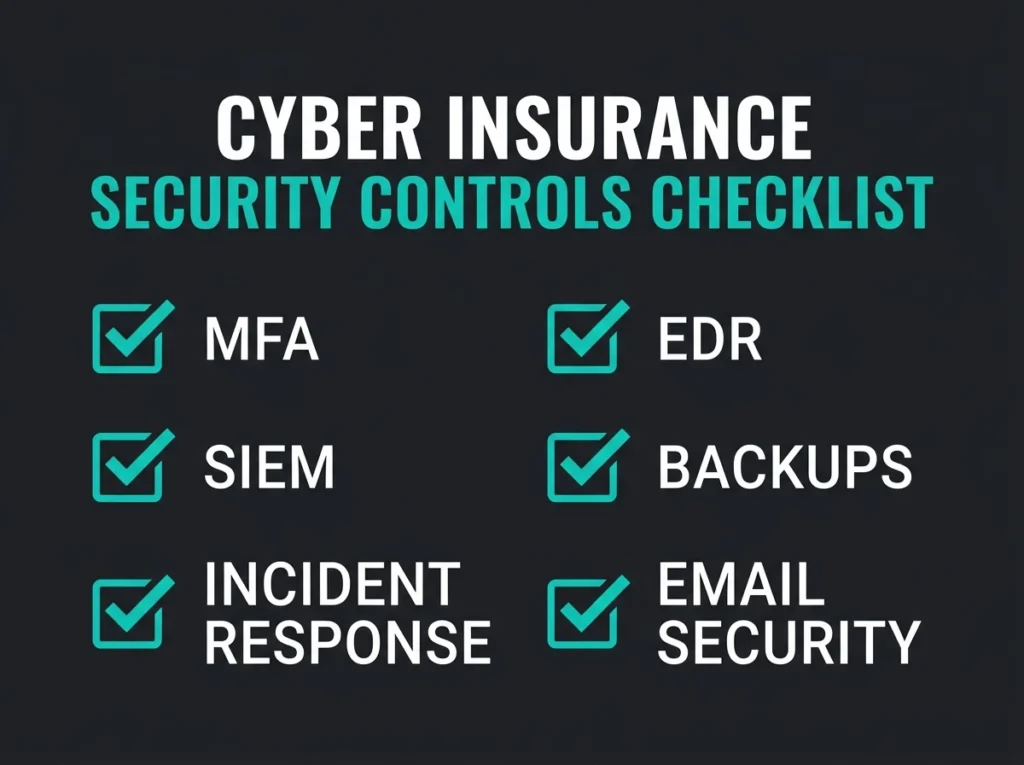
The renewal questionnaire just landed and it is twice as long as last year. MFA everywhere, EDR on every endpoint, a tested incident response plan, documented backup restoration tests, SPF/DKIM/DMARC at p=reject. If you cannot tick every box on page three, expect a higher premium, reduced coverage, or a polite rejection letter.
Cyber insurance requirements have shifted hard over the last 24 months. Falconer Security works with SMBs across Europe who are dealing with stricter underwriting and NIS2 obligations landing in the same quarter, so the questionnaire and the compliance memo often ask for the same evidence. What follows is what insurers actually want in 2026, how each control maps to a Microsoft environment, and what goes wrong when a control is “mostly” in place.
- Controls come before coverage. Underwriters now want MFA, EDR, SIEM, tested backups, and an incident response plan in place before they bind a policy, and proper implementation earns lower premiums and fewer denied claims.
- Eight controls dominate every questionnaire. MFA, EDR, SIEM, immutable backups, a tested IR plan, DMARC-enforced email security, privileged access management, and 14-day critical patching cover virtually every 2026 application.
- MFA gaps are the fastest premium hike. MFA blocks more than 99.2% of account compromise attacks, and a VPN that still accepts password-only login is the quickest route to a 50% premium increase.
- A tested IR plan saves USD 250,000. IBM’s 2025 data shows organisations with a tested incident response plan cut breach costs by roughly that amount, and insurers price it in.
- NIS2 work doubles as underwriting prep. A security program built against NIS2 Article 21 passes most cyber insurance questionnaires with minimal additional work.
Why cyber insurance requirements keep getting stricter
The global cyber insurance market reached around USD 16.3 billion in premium in 2025 according to Munich Re. That is close to three times what the market was five years earlier, and the growth curve is almost entirely a ransomware and supply-chain story.
Insurers learned the hard way. Early policies had loose controls language, and when ransomware went industrial in 2020-2021 the payouts surged faster than the pricing models could adapt. The Verizon 2025 Data Breach Investigations Report found 30% of breaches involved a third-party compromise (double the previous year) and 75% of system-intrusion breaches were tied to ransomware. Underwriters do read those numbers.
The result was predictable. Carriers stopped writing blanket policies. A modern application reads more like a technical audit than an insurance form, and specific controls have to be in place before coverage binds.
What happens when you miss a requirement
Four common outcomes, ordered roughly by how often we see them. The application is rejected outright, which is the rude version. The insurer caps coverage well below your real risk exposure, which is the polite version. Premiums jump by 50% or more for shops missing basic controls, which is the “we will write it but you will hate the price” version. Or the worst one: the policy binds fine, the premium gets paid, then a claim comes in and the insurer discovers the controls that were claimed were not actually in place when the breach happened. The claim gets denied. The premium is not refunded.
The eight security controls insurers want in 2026
Every insurer uses a slightly different questionnaire, but the same eight controls show up on virtually every application today. Miss one and you can lose the whole policy, so the sequence below covers the full list.
1. Multi-factor authentication on every access point
MFA is the single most impactful control you can deploy, and every carrier knows it. Microsoft’s own numbers say MFA blocks more than 99.2% of account compromise attacks, which is why it is non-negotiable on the form.
Underwriters want MFA enforced on email (Microsoft 365, Google Workspace), remote access (VPN, RDP, cloud applications), every administrative account (domain admins, Entra ID Global Admins, tenant admins for any cloud service), and privileged access to servers and network infrastructure. “Most users have MFA” is not an answer you want to write on an application.
For Microsoft 365 shops, two paths exist. Enable Security Defaults, which enforces MFA for all users at no extra licensing cost and is the right answer for smaller tenants. Or configure Conditional Access policies under Microsoft Entra ID, which wants Entra ID P1 but gives granular control and lets you require phishing-resistant MFA (FIDO2 keys, Windows Hello) on admin accounts. The latter is what we recommend once an organisation outgrows Security Defaults, usually around 100 seats or whenever admin account volume grows past a handful.
Common gap: A lot of organisations turn on MFA for email and skip VPN or RDP. Underwriters now ask about remote access MFA specifically. A VPN that still accepts password-only authentication is a red flag on the form and, in our experience, the single fastest way to a 50% premium increase.
2. Endpoint detection and response
Traditional antivirus matches files against known malware signatures. Modern attackers bypass that trivially using fileless payloads, living-off-the-land techniques, and built-in utilities like PowerShell or WMI. Insurers now expect EDR, or managed detection and response built on top of EDR, instead of legacy antivirus.
EDR watches endpoint behaviour in real time: process execution chains, credential access patterns, lateral movement, command-and-control traffic. If a process does something that looks wrong, EDR flags it whether or not a signature exists. That is the shift that has been going on for a decade, and insurers have finally priced it in.
For Microsoft environments, Microsoft Defender for Endpoint covers this and is included with Microsoft 365 E5 and Defender for Business licenses. Attack surface reduction (ASR) rules, automated investigation, and endpoint isolation want to be enabled. A deployment where Defender is installed but none of those features are active shows up on the questionnaire as partial coverage, which is scored as no coverage by most carriers.
3. Security information and event management
SIEM collects and correlates security data from across the environment (endpoints, email, identity, cloud infrastructure, network) so coordinated attacks that span multiple systems are actually detectable. Without it you are looking at each system in isolation and missing the pattern.
Carriers increasingly ask about centralized log management and threat detection on the application. For Microsoft shops, Microsoft Sentinel is a cloud-native SIEM that ingests logs from Microsoft 365, Entra ID, the Defender suite, and Azure resources without a lot of integration work.
Running SIEM in-house is beyond what most small teams can realistically handle. Managed SIEM services get you 24/7 monitoring and detection engineering without building a SOC, and the monthly operational reports that come with a managed service double as evidence on the next insurance renewal.
4. Tested and immutable backups
Ransomware changed how insurers look at backups. Having backups is no longer enough. They want evidence the backups are actually usable in the scenarios they are meant for.
The specific ask is that at least one copy is immutable or air-gapped, because attackers target backup systems first and ransomware on the same network will encrypt the backups too. Azure Immutable Blob Storage, AWS S3 Object Lock, or a physically disconnected copy are all acceptable. Restoration tests want to be documented, with dates and outcomes, not green backup job logs (which prove the backup job ran, not that a restore would work). And the coverage has to include Microsoft 365 data: Exchange, SharePoint, OneDrive, Teams. Native retention is not a substitute.
Important: Microsoft 365 retention policies are not backups. If an attacker deletes data or encrypts SharePoint sites, retention policies may not save you. Use a dedicated M365 backup product (Veeam, AvePoint, or similar) that stores copies outside the tenant.
5. A documented and tested incident response plan
According to IBM’s 2025 Cost of a Data Breach report, organisations with a tested incident response plan reduce breach costs by roughly USD 250,000 compared to shops without one. That is real money, and insurers price it in.
The IR plan wants defined roles and responsibilities (who leads response, who talks to customers, who talks to regulators, who talks to press), escalation procedures and communication chains, technical containment steps for common scenarios like ransomware, business email compromise, and data exfiltration, and pre-arranged third-party contacts: legal counsel, a retained forensics firm, the insurer’s own claims hotline. Evidence of tabletop exercises or simulations run within the past 12 months is increasingly asked for specifically, not just implied.
A virtual CISO can develop and maintain the plan, run the tabletops, and keep everything current as the environment evolves. For SMBs without full-time security leadership this is usually the right path, because an out-of-date IR plan is almost worse than no plan at all.
6. Email security past the defaults
Phishing is still the most common initial access vector. The FBI IC3 2024 report named phishing and spoofing as the most frequently reported cybercrime category, with business email compromise accounting for roughly USD 2.8 billion in losses in that year alone.
Carriers look for four things on email security. Authentication records (SPF, DKIM, and DMARC configured and enforced, with DMARC at p=reject or at minimum p=quarantine), advanced threat protection (Safe Links and Safe Attachments in Microsoft Defender for Office 365 to block zero-day phishing and malicious attachments), anti-spoofing policies protecting against display-name spoofing and domain impersonation, and security awareness training that includes regular phishing simulations with documented completion rates.
Default Microsoft 365 email security leaves real gaps. Exchange Online Protection catches known threats but struggles with zero-day phishing, targeted BEC, and impersonation that is specifically aimed at your finance team. Adding Defender for Office 365 and tuning it is the fix, and it is cheap relative to a BEC payout.
7. Privileged access management
Stolen credentials are still the top attack vector. The Verizon DBIR has named credential theft and misuse as a primary breach method year after year, with 88% of system-intrusion breaches involving stolen credentials in the 2025 edition.
Four controls show up on most applications. Least privilege enforcement, so users and admins have only the access they need. Separated admin accounts, so day-to-day work happens under standard accounts and administrative tasks use dedicated admin accounts. Just-in-time access, where admin privileges are activated only when needed and revoked automatically on a timer (Microsoft Entra Privileged Identity Management is the native answer). And regular access reviews, quarterly at minimum, with documented removal of permissions that are no longer needed.
In Microsoft environments, Entra ID Privileged Identity Management gives you the just-in-time flow and the access reviews. Pair PIM with Conditional Access policies that require MFA for admin sessions and you satisfy most insurer requirements for privileged access. Shops without PIM are leaving money on the table.
8. Vulnerability management and patching
Unpatched systems are the path of least resistance. Underwriters ask about the patch management process directly: how fast critical patches are applied, whether vulnerability scanning runs on a schedule, and how remediation is prioritised when the scan produces a list that would take a year to finish.
The standard asks are critical patches applied within 14 days of release (72 hours for actively exploited vulnerabilities where that is known), vulnerability scanning on at least a monthly cadence (weekly preferred), a documented patching cadence where exceptions are tracked and justified rather than quietly ignored, and end-of-life systems identified with a plan to upgrade or isolate them.
Defender for Endpoint includes built-in threat and vulnerability management that identifies unpatched software, prioritises by active exploit status, and tracks remediation. For Azure workloads, Microsoft Defender for Cloud does continuous vulnerability assessment. Both are included in the licenses most Microsoft shops already own.
Cyber insurance requirements checklist
| Control | What insurers ask | Microsoft solution |
|---|---|---|
| MFA | Enforced on all remote access, email, admin accounts | Entra ID Security Defaults or Conditional Access |
| EDR | Deployed on all endpoints with 24/7 monitoring | Defender for Endpoint / Defender for Business |
| SIEM | Centralised log collection and threat detection | Microsoft Sentinel |
| Backups | Immutable/air-gapped, tested, covers M365 | Azure Immutable Storage plus third-party M365 backup |
| Incident Response | Documented plan with annual tabletop | vCISO-managed IR planning |
| Email Security | SPF/DKIM/DMARC enforced, advanced threat protection | Defender for Office 365 plus DMARC at p=reject |
| PAM | Least privilege, separate admin accounts, JIT access | Entra PIM plus Conditional Access |
| Patching | Critical patches within 14 days, regular scanning | Defender TVM plus Defender for Cloud |
Where NIS2 and cyber insurance overlap
For organisations operating in the EU, cyber insurance and NIS2 Directive obligations overlap significantly. NIS2 Article 21 requires “appropriate and proportionate” cybersecurity risk management for entities in essential and important sectors, and the list of controls the directive expects looks remarkably like the insurer’s questionnaire.
Both frameworks want risk assessment and risk management in place, incident handling and reporting procedures, business continuity and disaster recovery planning, supply chain security and third-party risk management, vulnerability management and disclosure, and access control policies with asset management. The wording differs, the underlying controls are the same.
The practical benefit is that a control built to satisfy the insurer moves you most of the way to NIS2 compliance, and the reverse is also true. For SMBs trying to do both at once with one security budget, this overlap is the difference between “affordable” and “impossible”.
Falconer Security observation: Shops that build their security program against NIS2 Article 21 tend to pass cyber insurance underwriting questionnaires with minimal additional work. The controls are fundamentally the same.
How to prepare for the cyber insurance application
Step 1: run a security assessment first
Before you start filling out anything, know where you stand. A Microsoft 365 security assessment surfaces gaps in MFA enforcement, email security, admin access controls, and configuration baselines. You will know exactly which boxes you can honestly tick and which ones need work before the questionnaire arrives back.
Step 2: fix the dealbreakers
Focus first on the controls that trigger automatic denials. MFA everywhere (email, VPN, RDP, admin accounts) is a binary yes-or-no question with no middle ground on the application. EDR on all endpoints, because legacy antivirus alone is no longer accepted anywhere in the market. Immutable backups with documented restoration tests. These three carry the majority of underwriter concerns and are usually the fastest to implement.
Step 3: document everything
Carriers do not just ask if you have controls. They ask for evidence. Prepare screenshots of MFA policies (Entra ID Conditional Access configuration), EDR deployment reports showing coverage percentage, backup restoration test results with dates, the IR plan document with the date of the last tabletop exercise, and patch management reports showing average remediation time. An application backed by real artefacts gets better pricing than one that says “yes” to every question without proof.
Step 4: consider managed services
For SMBs without a dedicated security team, running all eight controls in-house is an uphill battle. Managed detection and response covers 24/7 endpoint monitoring and response. Managed SOC services cover SIEM monitoring and incident handling. A virtual CISO handles governance, risk assessments, and compliance documentation. These services map directly to insurer checklists and produce the documentation artefacts underwriters want to see, so they pay off twice: once at renewal and again if you ever have to file a claim. For a deeper look at scope and pricing, see our complete guide to virtual CISO services for SMBs.
Frequently Asked Questions
What security controls are required for cyber insurance?
Most carriers want multi-factor authentication on all access points, endpoint detection and response on every endpoint, immutable or air-gapped backups with documented restoration tests, a tested incident response plan, email security with DMARC enforced, privileged access management, centralised log management through a SIEM, and a vulnerability management program with defined patching timelines. Missing any of those usually triggers higher premiums or reduced coverage.
Can you get cyber insurance without MFA?
In 2026, MFA is effectively mandatory. Most carriers will not bind a policy without MFA enforced on email, remote access, and administrative accounts. Microsoft reports that MFA blocks more than 99.2% of account compromise attacks, which is why it is the single most impactful control from an underwriting perspective.
How do NIS2 requirements relate to cyber insurance?
NIS2 Article 21 wants risk management, incident handling, business continuity, supply chain security, and access controls. These overlap almost entirely with standard cyber insurance requirements. Shops that build their security program around NIS2 compliance tend to satisfy insurer questionnaires with little additional work.
What happens if you don’t meet cyber insurance requirements?
Failing to meet requirements can result in denied applications, significantly higher premiums, reduced coverage limits, or denied claims after a breach. Some carriers have increased premiums by 50% or more for organisations missing basic controls like MFA and EDR.
Do SMBs need cyber insurance?
Yes. SMBs are increasingly targeted because they typically lack the security resources of larger organisations. The IBM 2025 Cost of a Data Breach report found the global average breach cost was USD 4.44 million. For an SMB, even a fraction of that number can be terminal. Cyber insurance provides financial protection and access to incident response resources that most small businesses cannot keep on retainer internally.