






Identity & Entra
- MFA coverage gaps, user by user
- Conditional Access mapping: holes, conflicts, legacy-auth exceptions
- Privileged-role inventory and break-glass exposure
- Guest and dormant accounts
- OAuth app and service-principal consent hygiene

A senior security engineer assesses your Microsoft 365 tenant against CIS and CISA baselines, correlates the findings into real attack paths, and hands you a prioritised fix list. Not a 200-checkbox dump.

Almost nobody assesses a tenant for fun. One of these usually forces the question.
The auditor wants proof of technical measures, not intentions.
You need to answer with findings, not guesses.
And you are not certain the honest answers look good.
Defaults shipped it working, nobody hardened it.
It was caught late, and now leadership is asking what else is open.
Years of admins, exceptions, and “temporary” settings nobody documented.
of organisations have effectively enforced MFA across Microsoft 365. The rest have gaps they mostly do not know about.
of compromised accounts did not have MFA in effect. The single most common finding is also the most exploited one.
Four surfaces, specific enough to be checkable. Endpoints, Intune, and Azure infrastructure are separate assessments, so this one stays deep instead of wide.
Free tools print pass/fail lists; a technical buyer can run one this afternoon. What they do not do is connect the findings. Our assessors build detections and respond to incidents for a living, and they read your tenant the way an attacker would.
Every scanner scores this green. On paper, you are covered.
Flagged as minor. Old protocols, small blast radius, easy to ignore.
Legacy auth never triggers MFA, so the “pass” above is hollow. This pairing is attack path #1 in the report.
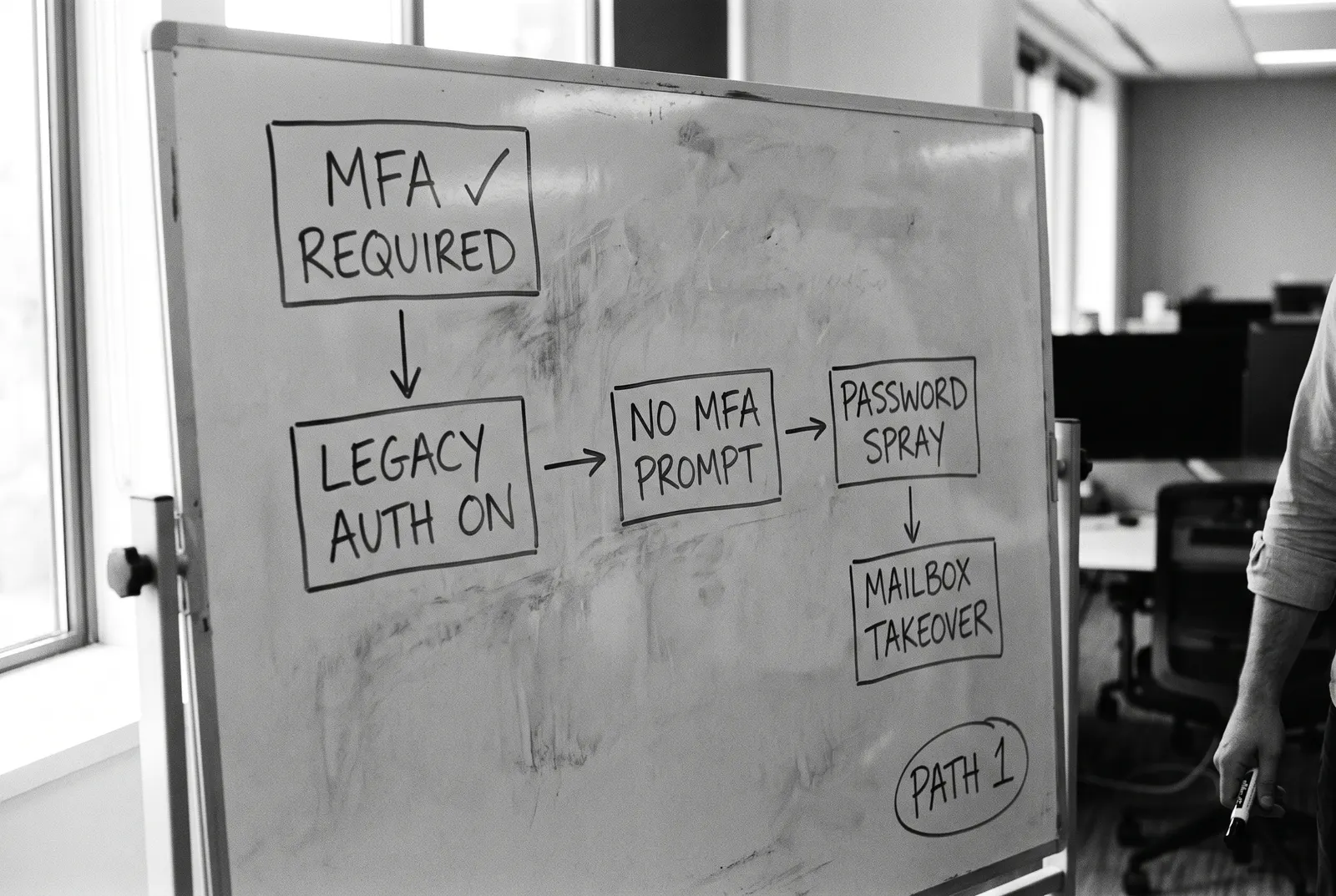
A checklist scores settings one at a time. We score the paths between them, and that is what you pay a human for.
This is attack path #1 from a real assessment, drawn the way we work it: two findings a scanner rates green and low, ending in a mailbox nobody would notice was gone.
The report is the product, so here is what it looks like: board-ready, remediation-ready, and auditor-ready, in one document.
Overall risk, what it means for the business, and the decisions that need making, in two pages a CFO reads without a translator.
Every finding remediation-ready: what we checked, what we expected, what we found, and exactly how to fix it.
Findings mapped to control references, so the same document doubles as audit and insurance evidence.

The quiet fear with any assessment is access and breakage. Here is exactly how it works.
We change nothing. No settings touched, no agents installed, no user impact, no downtime.
Scoped, delegated read access via GDAP that you grant and can revoke the moment we are done.
Automated collection across Microsoft Graph and Exchange, checked against the CIS M365 Benchmark and CISA SCuBA baselines.
A senior engineer reads the results, correlates them into attack paths, and prioritises. The checklist is the start, not the deliverable.
Collection is hours, analysis is days. You get findings while they are still true.
Evidence is handled under GDPR, stored in the EU, and deleted on the schedule we agree.
An assessment that only names problems is a stress generator. Three honest ways forward, and the report stands alone whichever you pick.
Portal steps or PowerShell, per finding. Many clients remediate in-house with the report alone, and that is a fine outcome for us.
A scoped engagement that closes the top findings, then hands the tenant back hardened.
M365 Security Management keeps posture from drifting back. If the assessment shows you need eyes on the tenant, that is MDR and Sentinel. Explore MDR and Managed Sentinel.
The ladder is explicit so nobody feels sold to twice.
A conversation and a light posture snapshot. Enough to tell whether a full assessment is worth your money, and we will say if it is not.
The complete engagement on this page: four surfaces, attack-path analysis, the three-reader report, and the readout call. Priced on users and complexity, quoted before we start, no surprises.
Fix it yourselves with the report, have us close the top findings, or move to managed services. No obligation baked into the assessment.
Assessments are one-time engagements. No retainer, no auto-renew, no lock-in.
No changes, ever. The assessment is read-only: no agents installed, no settings modified, no user impact, no downtime. Users never notice it happened.
Scoped, delegated read access granted via GDAP. You grant it at the start, and you can revoke it yourself the moment the engagement ends, without asking us.
Days, not weeks. Automated collection runs in hours; expert analysis and report writing take a few days after that. You get the exact date at scoping.
No, and that is the point. Tooling gives us coverage; the value is a senior engineer correlating the results into attack paths: which combinations of settings an attacker would actually chain together, in priority order. A free scanner cannot make that judgment.
One report written for three readers: an executive summary for the board, remediation-ready technical findings with the fix per finding, and compliance mapping to control references. Plus a 1:1 readout call to walk the findings.
Yes. Technical baselines are the CIS Microsoft 365 Foundations Benchmark and CISA SCuBA; every finding also maps to NIS2, ISO 27001, GDPR, and Cyber Essentials references where relevant, so the report doubles as audit evidence.
The report is written to be handed over: control references, evidence, and status per finding. Auditors and insurers accept documented third-party assessments; yours will tell you if they need anything further, and the compliance mapping makes that conversation short.
Your choice. Every finding includes the fix, so your team can remediate in-house. If you want help, we offer scoped quick-hit remediation, ongoing M365 Security Management, or managed detection if the assessment shows you need monitoring. The report stands alone either way.
The free review is a 30-minute conversation with a light posture snapshot: honest advice on whether a full assessment is worth it. The full assessment is a fixed-fee engagement priced on tenant size and complexity, quoted before we start.
Usually not. Most findings are misconfigurations of features you already license, and the report flags any fix that would genuinely require a licensing step up, with the cheaper alternative alongside it. Unused-license findings often fund the gaps.
A Microsoft security specialist reads every message and replies, usually within one business day. Whether you need monitoring, help with a specific tool, or just have a question, start here.
New to this? Ask about a free Microsoft security review as a starting point.
"*" indicates required fields