MCP Security Risks in Sentinel: What SOC Teams Need to Know

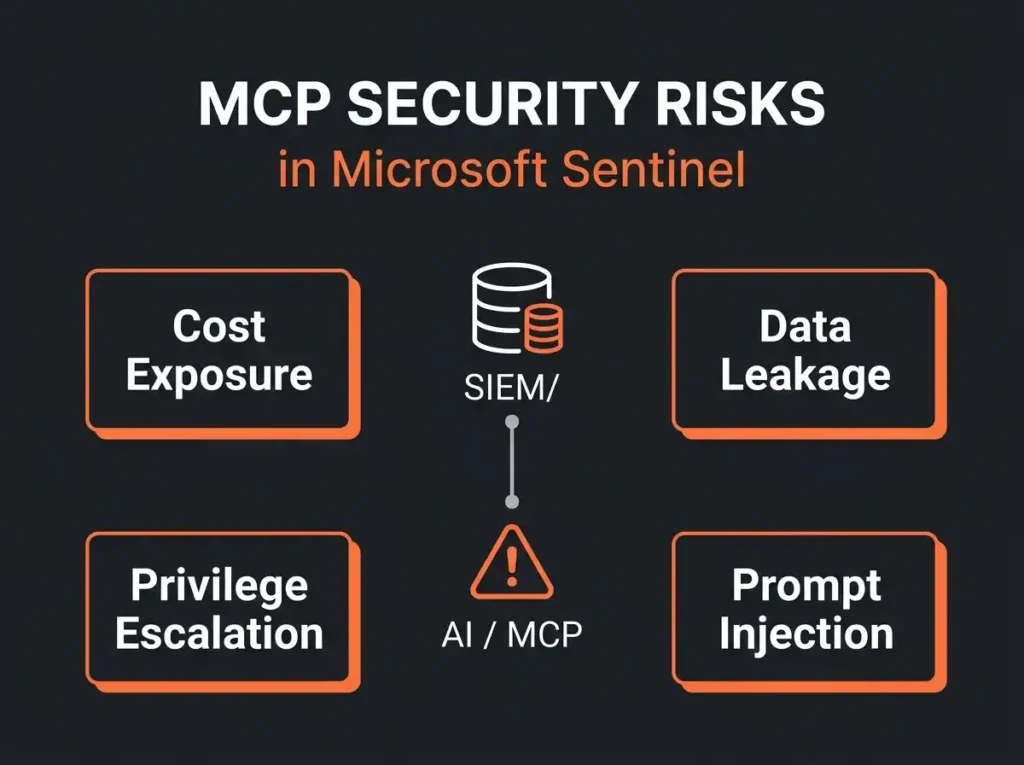
MCP plus Sentinel is a real productivity unlock for SOC analysts, and it is also the fastest way I have seen to burn $500 on a single query. Both things are true at once, which is the tension this post is about.
For the unfamiliar: MCP (Model Context Protocol) is the standard way AI assistants talk to external tools. Plug an AI client into the official Microsoft Sentinel MCP server and an analyst can ask “show me odd sign-ins for marketing over the weekend” and get back KQL results through natural language. The gain is obvious. The problem is that MCP was designed for access, not governance. Every guardrail the Azure portal imposes on you is stripped away, and one sloppy prompt can pull sensitive data into the wrong context, fire an unauthorized response action, or scan the entire data lake and hand you the bill on Monday.
As a managed Sentinel provider we keep watching customers adopt MCP without reading the fine print. This post covers the Sentinel MCP security risks that fine print usually hides.
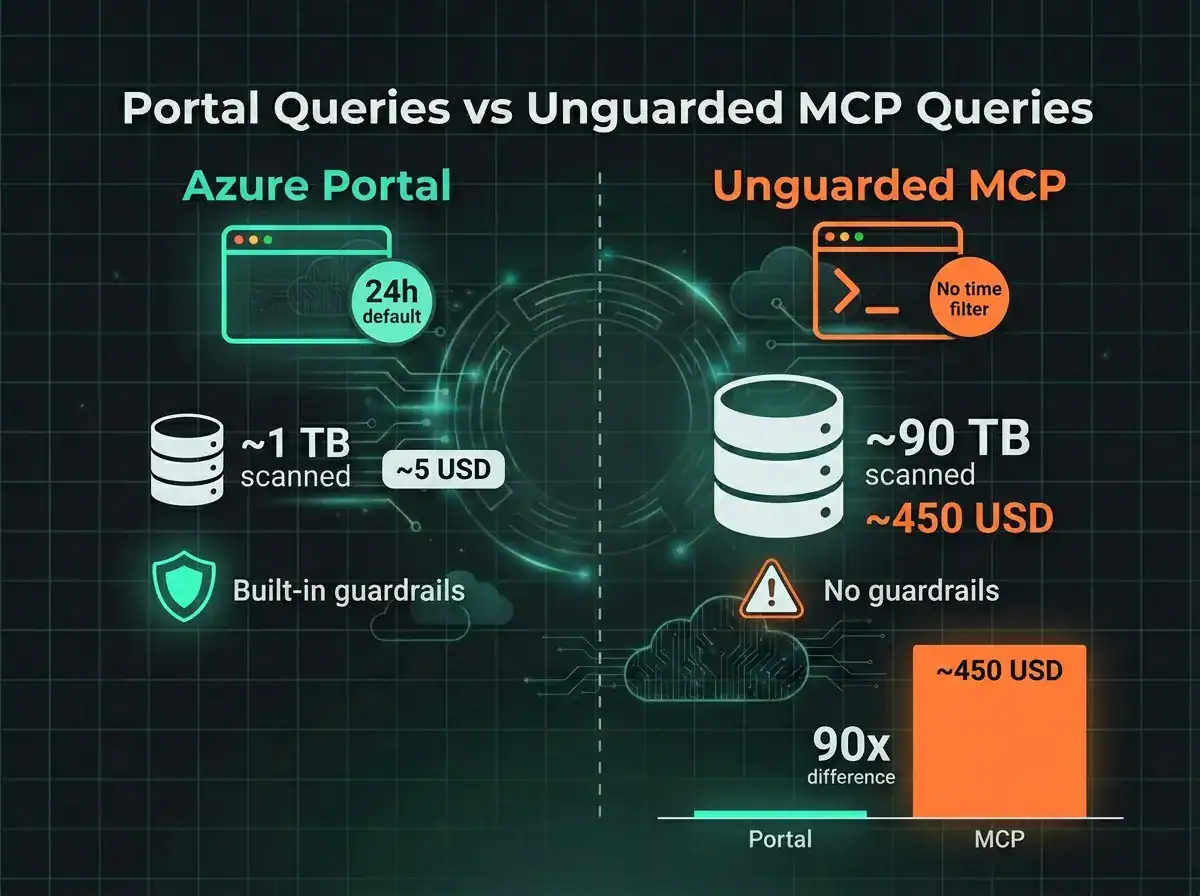
- Bill shock is the visible risk. Sentinel data lake queries bill at $0.005 per GB scanned, so one KQL query without a time filter against a 90 TB lake costs roughly $450.
- MCP strips portal guardrails. The 24-hour default lookback, query size limits, and UI-rendered RBAC all vanish; queries run with the service principal’s raw permissions, often workspace-wide reader.
- Response actions need human approval. Tools like playbook execution and account isolation are one prompt away from firing without the ticket and approval trail a mature SOC requires.
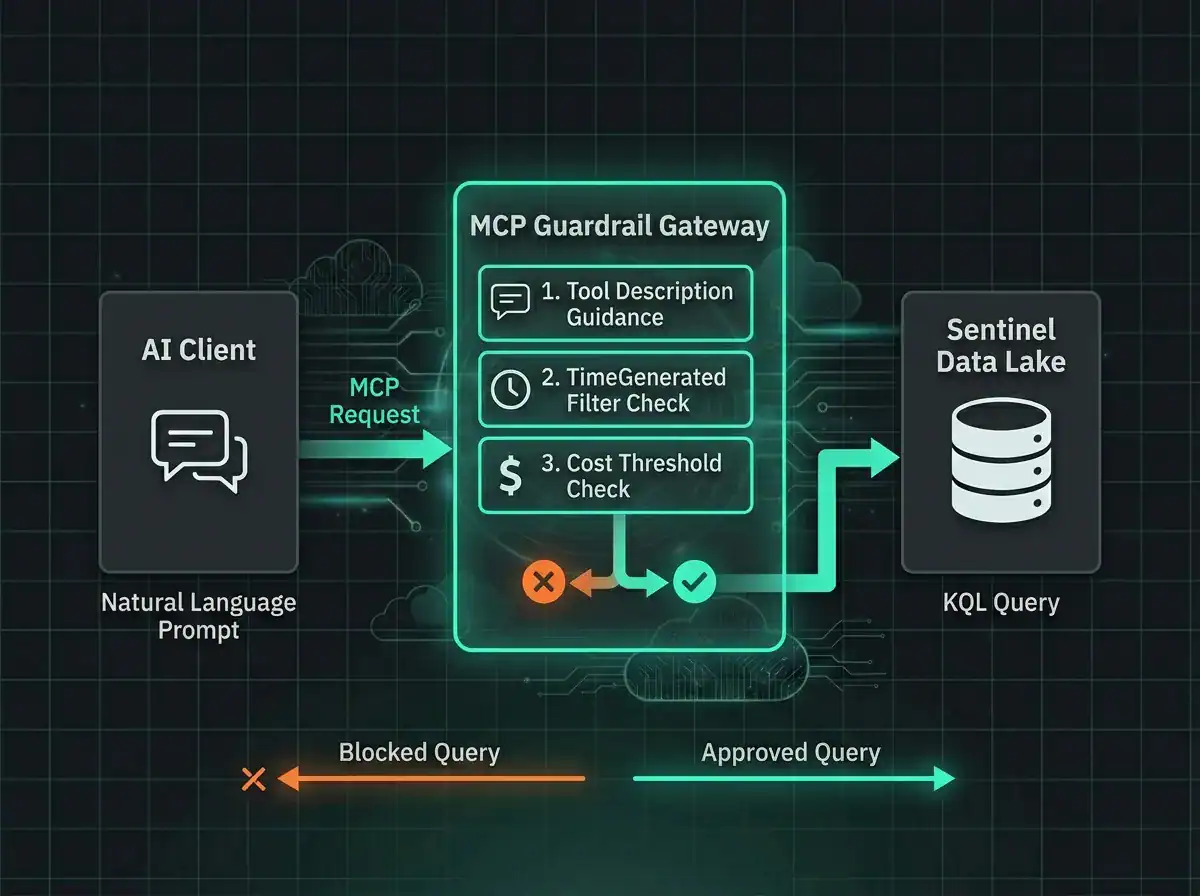
- The wrapper pattern is the fix. A gateway between the AI client and Microsoft’s MCP server enforces mandatory time filters, table allowlists, and a pre-execution cost threshold (a $10 default works) without forking the upstream server.
- Prompt injection arrives via your own logs. Crafted text in a log entry the model reads during hunting can trigger unintended queries or response tools, so treat investigated data as potentially adversarial.
What MCP actually does inside a SOC
Under the hood, MCP servers are the translation layer between an AI model and a platform. On the Sentinel side, the official MCP server exposes tools like query_lake for running KQL against the data lake, list_incidents, and run_playbook. The analyst asks a question in plain language, the AI composes the KQL, MCP runs it, and results come back shaped for a model to reason over.
That is not the same as clicking around in the Azure portal. The portal and Defender Advanced Hunting interface enforce a set of defaults the average SOC analyst has taken for granted for years: a 24-hour lookback, query size limits, RBAC rendered in the UI. None of that is in the MCP path. The model gets raw API access through the service principal, composes whatever KQL it likes, and the query runs exactly as composed. There is no dialog box that pops up when it forgets a time filter.
The bill shock problem
Let me put a number on this, because the number is what tends to focus attention. Microsoft Sentinel data lake billing is $0.005 per GB scanned. That sounds like nothing until you think about volume.
A mid-market customer ingesting 1 TB a day with a 90-day retention window is sitting on roughly 90 TB of queryable data, and that ingestion pipeline is exactly what shifts under the AMA destination changes affecting Sentinel deployments. A KQL query without a TimeGenerated filter does not get scoped down politely; it scans the whole table. Do that against 90 TB once and you have spent around $450. Per query. If the prompt was vague enough that the model tried three variations, it is $1,350 before coffee.
Here is what makes this worse than it sounds. The portal hides this problem entirely. Sentinel’s UI and Defender Advanced Hunting both fill in a 24-hour lookback by default if you forget one, which has been papering over a lot of bad query writing for a long time. MCP does not paper over anything. Feed an AI model “show me recent sign-in failures,” get back technically-correct KQL that drops the time filter, and you are burning through the data lake budget without a confirmation dialog ever firing.
Real-world impact: Security practitioners have reported single accidental MCP queries costing $450+ against production Sentinel data lakes. The queries were not malicious. They were vague prompts that an AI interpreted without the time constraints humans take for granted.
The Sentinel MCP security risks that are not on the invoice
Cost is the most visible MCP problem, but it is not the most dangerous. A few other categories of risk show up in client environments, and most teams have not thought them through before deployment.
Data exposure through broad queries
Your MCP service principal has whatever read permissions you gave it, and in most deployments those permissions are broader than the humans using the system realize. Say an analyst asks “find anomalous activity for john.smith.” A reasonable prompt. The model, left to its own devices, might pull sign-in logs, Exchange message trace, SharePoint access, endpoint telemetry, VPN records, and the full activity audit. Much more data than the question implied, quite possibly including categories of data that belong to separate analyst roles in the human workflow.
When John Smith is looking through the portal he sees data filtered through RBAC. When an AI model queries via MCP, the filter is the service principal’s own permissions, which tend to be workspace-wide reader for convenience. That turns the AI model into an accidental privilege escalation path. Nobody sat down and designed it that way. It just falls out of how MCP is usually provisioned.
Response actions without a human in the loop
If your MCP server exposes response tools (playbook execution, entity isolation, incident state changes), the AI is now one prompt away from taking an action that normally goes through a ticket, a change window, and an on-call approval. “Contain this compromised account” is the kind of instruction a well-meaning analyst might give mid-incident, and the model will happily execute an account disable if the tool is wired up to do so.
In a mature SOC there is a paper trail for every response action, because regulators, insurers, and post-incident reviewers all need it. MCP short-circuits that trail by default. The human-in-the-loop step has to be re-added deliberately; it is not there out of the box.
Prompt injection sneaking in via your own logs
This one is counterintuitive. MCP tools process instructions from the model, which in turn has been trained on whatever the user typed plus whatever context the model pulled in. If an attacker can shape that context, they can shape the tool calls. Phishing the analyst’s chat, poisoning a document the analyst asks the model to summarize, or (and this is the nasty one) planting crafted text in a log entry the model reads during threat hunting.
Prompt injection against tool-using AI systems is not theoretical. It is actively researched and routinely demonstrated, and it sits alongside the wider run of geopolitical cyber threats Nordic SMBs are facing in 2026. A log entry with the right structure can trick a model into running follow-up queries or firing response tools that the analyst never intended. You have to assume any data your model reads during an investigation could contain adversarial instructions and design around that.
What a managed provider should enforce
If you are running MCP against Sentinel through a managed SIEM service, the provider should be running the controls below. These are not extras; they are the baseline we treat as non-negotiable on any engagement where MCP is in scope.
Guardrails on every query
Every MCP-originated query hitting the data lake should be policed by hard constraints before it ever reaches the cluster. That means time filters are mandatory: no TimeGenerated clause, query rejected, default lookback of 24 hours injected if the AI omitted it, and explicit unbounded scans blocked at the gateway level rather than softly discouraged. Table access needs to be an allowlist rather than a denylist, because denylisting tables in a platform where new tables appear routinely is a losing game. And cost estimation needs to run pre-execution: estimate scan size from table statistics and the time range, block anything projected above a threshold (I set this at $10 per query as a default), and require explicit analyst confirmation on anything more expensive. Every query that gets through the gateway logs the originating user, the model version, the original prompt, the generated KQL, and the scan cost. That is what makes cost attribution and incident investigation possible later.
Access scoped to the individual, not the service
Service principals for MCP should be least-privilege by design: read-only, scoped to specific tables, not workspace-wide reader. Read and write MCP endpoints should not be the same server; an analyst who can ask questions should not automatically be able to isolate hosts. And MCP requests should be attributable to individual analysts, not collapsed into a shared service identity, because per-user query budgets, role-based table access, and real audit attribution all collapse if every request looks like the same robot.
Approval workflows for anything destructive
Any MCP tool that changes state (disabling an account, isolating an endpoint, closing an incident) should sit behind explicit human approval. The AI can recommend the action, format the request, pre-fill the ticket, write the justification. The human confirms. Every action that fires gets logged with the approver, the AI’s reasoning, the incident context, the affected entities. That documentation is what gets you through compliance review and the post-incident report.
The wrapper pattern, in practice
The most practical implementation I have seen in production is a wrapper sitting between the AI client and the upstream Microsoft Sentinel MCP server. A lightweight gateway, nothing fancy, but every MCP call passes through it. The gateway applies policy, mutates the request if it needs to, or rejects it with a structured error the AI can reason about.
Why a wrapper rather than modifying the upstream MCP server? Because you do not want to fork Microsoft’s server. You want their changes for free as the ecosystem evolves, and you want your governance layer to survive every upstream version bump without merge conflicts. Keep the Microsoft integration pristine and sit your policies on top.
The wrapper combines two layers that work together. Soft guidance happens via the tool descriptions the AI sees: the wrapper rewrites them to include instructions like “Always include a TimeGenerated filter. Default to the last 24 hours. Prefer projecting specific columns over select-all.” That shapes how the model generates queries in the first place, and modern models (GPT-4.1 and later, Claude 4+, Gemini 2.5+) follow these reliably most of the time.
Hard enforcement runs underneath. Before anything reaches the data lake, the gateway validates it programmatically. Missing TimeGenerated: blocked. Table not on the allowlist: blocked. Estimated cost above threshold: blocked. The error returned to the AI is structured and actionable, telling the model how to fix the query so it can retry. Both layers are necessary. Prompt-level guidance handles the 95% case, but AI models are non-deterministic and will occasionally ignore instructions at the worst possible moment. The programmatic layer is what catches that 5%, which in a $450-per-mistake environment is the layer that saves you.
Key principle: Trust the AI model to follow guidance most of the time. Verify with programmatic checks every time. Never rely on prompt engineering alone for cost or security controls.
The pattern generalizes beyond Sentinel
Nothing about this problem is Sentinel-specific. Every AI integration in security operations has the same underlying shape, because AI models optimize for task completion. They do not optimize for cost, compliance, or your organizational boundaries unless you design those constraints in explicitly.
Microsoft Copilot for Security, custom GPT integrations, third-party AI security tools all face the same class of risk. The guiding principles carry across. Start from default-deny rather than default-allow, so AI tools begin with minimal permissions and earn access through explicit grants. Keep read and write operations at different authorization levels, because asking questions and taking action are not the same privilege. Log every AI-initiated action with enough attribution to survive a compliance review (and that is not optional for anyone working under NIS2, GDPR, or ISO 27001). Treat cost guardrails as security controls, because unbounded query cost is a denial-of-wallet attack surface that deserves the same discipline as access control.
What this means for your organization
If you are running MCP with Sentinel or planning to, the governance framework comes before the integration, not after. The questions I would want answered before the AI talks to production security data:
- Who has access to which MCP tools, and with what permissions on which tables?
- What cost controls are in place to block an accidental data lake scan, and at what threshold?
- Which response actions require human approval, and where does that approval live?
- Is there a per-query audit trail tying the originating analyst to the prompt, the generated KQL, the scan cost, and the result?
- How are the service principal permissions scoped, and are they reviewed quarterly?
For organizations working through a managed detection and response service, these controls should already be part of the provider’s standard operating procedure. An AI tool in a SOC is only as useful as the discipline around it, and the discipline is not something you bolt on later once the damage shows up on an invoice.
A Microsoft 365 security audit should now include an evaluation of AI tool integrations, MCP server configurations, and the governance around automated security operations.
Frequently asked questions
What is an MCP server in the context of Microsoft Sentinel?
An MCP (Model Context Protocol) server is a standardized interface that lets AI models talk to external tools and data sources. For Sentinel, the MCP server is how an AI assistant executes KQL against the data lake, pulls incident details, and triggers response playbooks via natural language, rather than through the Azure portal UI.
How much can an unguarded Sentinel MCP query cost?
Sentinel data lake queries bill at $0.005 per GB scanned. For an organization ingesting 1 TB daily with 90-day retention (around 90 TB stored), a single query without a TimeGenerated filter scans the whole table and costs roughly $450. A handful of those queries in a single session can rack up thousands in unexpected charges, which is why the first control any MCP deployment needs is mandatory time filtering.
Can AI models be trusted to follow query safety instructions?
Mostly, yes, and that is why prompt-level guidance through tool descriptions is part of the standard pattern. But AI models are non-deterministic, and they will sometimes ignore instructions, especially when prompts are vague or the session context is long. That is why programmatic enforcement has to sit underneath the prompt guidance, as a hard backstop. Never rely on model compliance alone for cost or security controls, because the one time it fails is the time that ends up in a retrospective.
Should we stop using MCP with Sentinel?
No. MCP integrations deliver real productivity gains for SOC analysts, and the answer to the risks is not to avoid MCP but to wrap it with sensible guardrails: mandatory time filters, table allowlists, cost thresholds, proper access controls, and approval gates for response actions. Governed MCP access is considerably safer than analysts building ad-hoc integrations without oversight.
How does this relate to Microsoft Copilot for Security?
Copilot for Security faces the same class of challenges but ships with some built-in guardrails that raw MCP access does not. Organizations running both need consistent governance across every AI touchpoint. The principles carry across: least privilege, audit trails, cost controls, and human approval for response actions.