Microsoft Sentinel Data Lake Meters: A Cost Management Guide

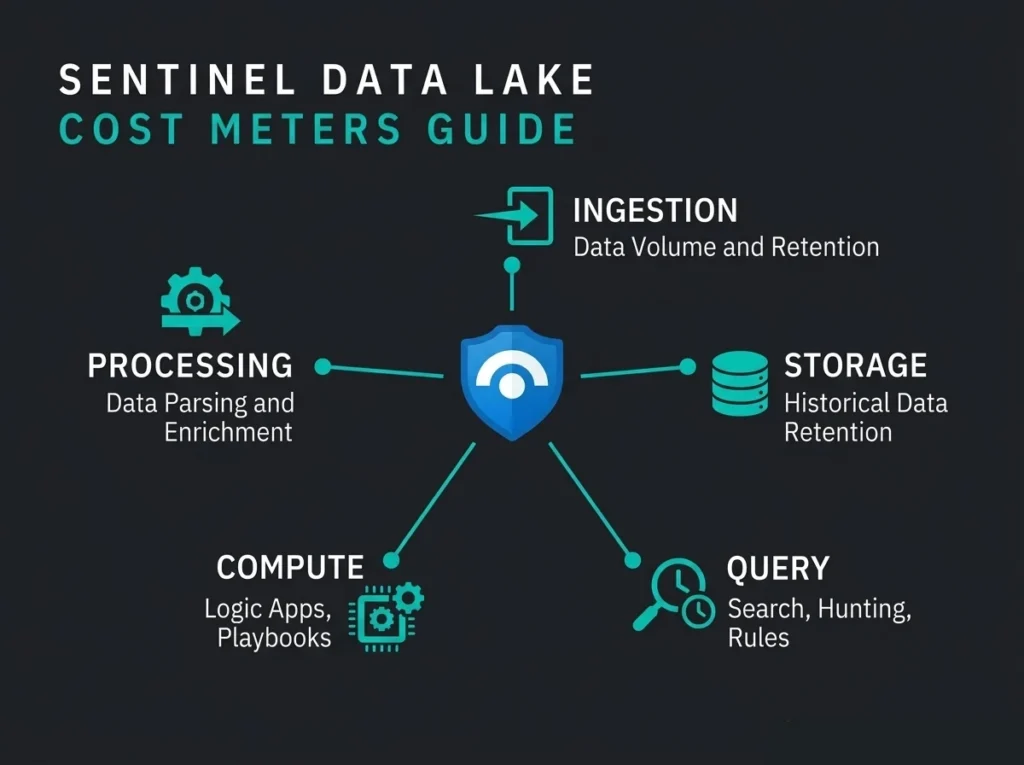
Your Microsoft Sentinel bill just got stranger. The new data lake tier added five separate meters to it, and most security teams have never set eyes on any of them. Falconer Security has been unpacking those meters for Nordic SMBs before they turn into quarter-end surprises.
The data lake tier shifts how Sentinel handles long-term security data. You can keep up to 12 years of telemetry at a fraction of analytics-tier prices, which sounds brilliant until the first invoice lands and someone asks why “Data Processing” is a line item.
Below: every meter, what actually moves the needle on each one, and how to keep an eye on spend using Azure Cost Management alongside the new Sentinel Cost Management feature inside the Defender portal.
- Five meters bill the lake. Data lake ingestion, storage, query, advanced data insights (compute hours), and data processing at $0.10 per GB each charge a different usage dimension.
- Expect 60 to 80% savings. Falconer Security typically sees that reduction when suitable log sources move from analytics-tier long-term retention into data lake storage.
- The lake never detects. Real-time rules, playbooks, and alerts stay on the analytics tier, so keep endpoint, identity, and other alert-driving logs there.
- Storage compounds quietly. A 10 GB/day table at 12-year retention accumulates over 40 TB billed monthly; most Nordic SMBs cover NIS2 needs with 1 to 3 years per table.
- Set thresholds on day one. Query costs are per GB scanned, so tight TimeGenerated filters plus per-meter notification alerts catch runaways before the invoice does.
What Is the Microsoft Sentinel Data Lake?
Microsoft Sentinel data lake is a cloud-native security data lake bolted onto Sentinel for cheap long-term storage. Data lives in open Parquet files, storage is split from compute, and queries only cost money when you run them.
It sits next to Sentinel’s existing analytics tier. Two storage layers, different costs, different capabilities:
- Analytics tier: the tier you already know. It runs real-time detections, fires alerts, triggers playbooks, and powers advanced hunting. Higher per-GB price, but data is queryable the moment it lands.
- Data lake tier: built for up to 12 years of retention. It supports KQL queries, Jupyter notebooks, and scheduled jobs. Cheaper per GB, but the design target is investigations and compliance evidence, not real-time detection.
Anything you ingest into analytics is automatically mirrored to the lake as a single copy. You can also send data straight to the lake and skip analytics entirely, which is the right call for logs that will never power an alert.
Key Point: the data lake does not replace the analytics tier. Real-time detection, alerting, and automated response still live there. The lake extends what you can retain and investigate later at a lower price per GB.
The Five Data Lake Meters Explained
Sentinel charges the lake across five separate meters. Skim past any one of them and your cost model stops being a model.
1. Data Lake Ingestion
Charges land per GB ingested into tables you’ve marked as lake-only. If a table is configured for both tiers, ingestion is billed at the analytics side and the lake copy comes along at no extra ingestion cost.
Cost drivers: any table flipped to lake-only mode, the volume of logs flowing into it, and new connectors piped directly into lake-only tables.
The discipline here is to be ruthless about what belongs in lake-only. Firewall flow logs, verbose auth telemetry, network metadata: fine. Entra sign-in logs, endpoint alerts, any log that needs to fire a rule: absolutely not.
2. Data Lake Storage
Storage is per GB per month, charged on data that has passed its interactive retention period or was dropped straight into the lake. This meter compounds. It’s the one that gets worse while you aren’t looking.
Three things move it: total retained volume across all tables, how long your retention policies run, and daily ingestion rates on high-volume tables. A 10 GB/day table at 12-year retention accumulates more than 40 TB, and you pay storage on all of it, every month, forever.
Set retention per table against real investigation and compliance needs rather than leaving everything at maximum. NIS2 asks for “appropriate” retention without nailing a number; most Nordic SMBs find 1 to 3 years covers the majority of log types comfortably.
3. Data Lake Query
Queries are billed per GB scanned when you run KQL, KQL jobs, or searches against lake data. This is the one that ambushes teams.
Drivers are depressingly simple: broad time windows (months when you needed days), missing filters (full table scans), scheduled jobs chewing through large datasets on every run, and ad-hoc hunts across years of history.
Tight KQL fixes most of it. Lead with where TimeGenerated > ago(7d) instead of scanning the entire retention window. Scope to specific tables. Push scheduled jobs into off-peak windows, and keep automated queries narrow.
4. Advanced Data Insights (Compute Hours)
Compute hours accrue whenever a Jupyter notebook session or scheduled job runs against lake data. The formula is cores in the compute pool multiplied by duration.
Cost drivers include notebook sessions left idle, oversized compute pools picked for small analyses, and scheduled notebook runs firing more often than anyone remembers.
Size the pool to the analysis. Close sessions when the work is finished. If a notebook runs on a schedule, pick a predictable window rather than letting analysts spin things up and wander off. A forgotten session over a long weekend costs more than a month of actual planned analysis.
5. Data Processing
Data processing is $0.10 per GB when you transform data flowing into lake-only tables. Transformations include redaction, filtering, splitting, and normalisation.
The drivers: transformation rules applied to high-volume lake-only tables, and multi-step pipelines running across large streams.
Be selective. If the whole point of lake-only mode was to save money, stacking transformations on top partly cancels the win. Where possible, transform at the source and let Sentinel receive clean data.
Data Lake Meters at a Glance
| Meter | Charges Based On | Key Cost Driver | Control Strategy |
|---|---|---|---|
| Data Lake Ingestion | GB ingested (lake-only tables) | Volume of lake-only data sources | Route only non-alerting logs to lake-only |
| Data Lake Storage | GB stored per month | Retention period x daily volume | Set per-table retention policies |
| Data Lake Query | GB scanned per query | Broad time ranges, unfiltered queries | Tight time filters, efficient KQL |
| Advanced Data Insights | Compute hours (cores x duration) | Long notebook sessions, large pools | Right-size pools, close idle sessions |
| Data Processing | GB processed ($0.10/GB) | Transformations on lake-only tables | Transform at source when possible |
Analytics Tier vs Data Lake Tier: Cost Comparison
There’s a real gap between the two tiers on price, which is the whole point of the lake. Knowing where each tier belongs is what separates “we saved money” from “we created a blind spot we didn’t notice for a quarter.”
| Capability | Analytics Tier | Data Lake Tier |
|---|---|---|
| Real-time detection rules | Yes | No |
| Automated playbook response | Yes | No |
| KQL queries | Yesincluded | Yesper GB scanned |
| Jupyter notebooks | No | Yesper compute hour |
| Maximum retention | Up to 12 years (archive tier) | Up to 12 years |
| Best for | Active threat detection | Investigations, compliance, forensics |
| Pricing model | Per GB ingested (PAYG or commitment) | Per GB ingested, stored, queried, computed |
Falconer Security typically sees a 60 to 80% cost reduction when suitable log sources move from analytics-tier long-term retention into data lake storage. “Suitable” is doing the heavy lifting there. Shovel security-critical logs out of the analytics tier to save money and you pay the difference back in missed detections, usually at the worst possible moment.
How to Monitor Data Lake Costs
Microsoft gives you two tools for tracking lake spend: Sentinel Cost Management inside the Defender portal, and Azure Cost Analysis. They’re complementary rather than redundant, and most teams end up using both.
Sentinel Cost Management (Defender Portal)
The new Sentinel Cost Management feature is still in preview. You’ll find it under Microsoft Sentinel, then Cost Management, inside the Microsoft Defender portal. It gives you cost views built specifically around the data lake tier.
Access is gated behind two roles in Microsoft Entra ID: Security Administrator, plus Billing Administrator. Note the Billing Administrator role means the Entra role, not the Azure subscription billing role (an easy ticket to log with the IAM team on day one).
The Usage page splits spending across the five meters:
- Data lake ingestion: total GB ingested, trend lines, top 10 tables by volume
- Data lake storage: total GB stored, trend lines, top 10 tables by volume
- Data lake query: total GB scanned across KQL, jobs, and search operations
- Advanced data insights: compute hours burnt by notebook sessions and jobs
- Data processing: GB processed through transformation rules
The Notifications page lets you set per-meter thresholds and get an email when you hit them. Example: alert when data lake query usage crosses 80% of a 1,000 GB threshold. Set these the day you turn the lake on. Nobody sets them “later.”
Azure Cost Analysis
The Sentinel data lake is a proper Azure resource (resource type: microsoft.sentinelplatformservices), so every meter surfaces in Azure Cost Management. You get the full Cost Analysis toolkit on top: budget alerts, cost exports, forecasting, and filtering by resource group or tag.
To pull lake costs out of Cost Analysis:
- Open Cost Management + Billing in the Azure portal
- Select Cost Management, then Cost Analysis
- Filter by Service name and pick Sentinel
- Group by Meter to see the individual data lake lines
Cost Analysis earns its keep when you want to compare lake costs against analytics-tier costs over time. That’s how you validate that your tier decisions are actually saving money rather than just shifting it between line items on the invoice.
KQL Queries for Ingestion Visibility
Analytics-tier data gets its own visibility layer: the Usage table. Queries against it reveal billable volume broken down by solution and data type.
Example: to pull daily billable ingestion by data type across the past 31 days, query the Usage table with
where IsBillable == true, summarise bybin(StartTime, 1d)andDataType, then render as a column chart. Microsoft publishes ready-made KQL queries you can lift straight into a workbook.
Cost Optimisation Strategies for the Data Lake
As part of ongoing Sentinel maintenance, lake costs come down to three decisions. What data goes where. How long you keep it. And how you query it once it’s sitting there.
Right-Size Your Tier Decisions
Not all security data needs real-time detection. Categorise sources honestly:
- Analytics tier (keep here): endpoint detection logs, identity sign-in events, email security alerts, firewall deny logs, Active Directory changes
- Data lake tier (move here): network flow metadata, verbose diagnostic logs, historical compliance data, raw telemetry from low-risk sources, application performance logs
- Both tiers: anything you need to detect on now and investigate years from now (analytics tier mirrors to the lake automatically)
Set Per-Table Retention Policies
Defaults waste money. Organisations inside NIS2 scope do need to retain logs that evidence Article 21 compliance. The directive doesn’t stick a number on it. Set retention to actual needs:
- High-value investigation data (identity, endpoint): 2 to 3 years
- Compliance evidence (audit logs, access reviews): 3 to 7 years depending on regulation
- Network telemetry (flow logs, DNS): 6 to 12 months
- Diagnostic and performance data: 3 to 6 months
Control Query Costs
Lake query is the sneaky meter. Every GB scanned costs money, so query efficiency is, for once, genuinely a budget item.
- Always filter on
TimeGeneratedto bound the scan window - Scope to specific tables rather than searching across everything
- Avoid
search *against lake data unless you want a lesson at month-end - Use scheduled KQL jobs for recurring analysis rather than repeating ad-hoc queries
- Put notification thresholds on the query meter so you catch runaways before the bill does
Use Notification Thresholds
Sentinel Cost Management lets you set thresholds per meter. Configure them when you turn the lake on:
- Ingestion thresholds at expected daily volume plus a 20% buffer
- Query thresholds aligned with your team’s investigation cadence
- Compute hour thresholds tied to planned notebook analysis
- A monthly review to adjust thresholds as usage patterns stabilise
Common Cost Mistakes to Avoid
From managing Sentinel deployments across Nordic client environments, Falconer Security sees the same lake mistakes on repeat:
- Moving security-critical logs to lake-only mode to save money. You lose real-time detection on those sources. The savings evaporate the first time a breach goes undetected for weeks.
- Setting 12-year retention on everything by default. Storage compounds. A table ingesting 10 GB/day at 12 years accumulates over 40 TB, and storage on all of it is charged every month. We walked through exactly this pattern in our Sentinel cost autopsy.
- Running broad queries without time filters. Scanning 3 years to find last week’s events means paying to scan 3 years. Filter first, always.
- Ignoring compute hours. Notebook sessions keep running (and charging) until somebody closes them. A session forgotten over a weekend will beat a month of planned analysis on cost.
- Not setting notification thresholds. Without alerts, overruns surface when the Azure invoice lands, weeks after the damage was done.
How This Fits with NIS2 Compliance
For organisations inside NIS2 Directive scope, the data lake answers a real compliance headache: keep security data long enough for incident investigation and regulator reporting without paying analytics-tier prices for the privilege.
NIS2 Article 21 asks essential and important entities to implement risk management measures, including incident handling and business continuity. Retaining telemetry is how you evidence that after the fact. The lake’s 12-year ceiling and lower per-GB storage cost turn long retention into something an SMB can actually afford, rather than a trade-off against the rest of the security budget.
Falconer Security recommends using the lake for extended retention on compliance-relevant logs while keeping active detection data on the analytics tier, all wrapped inside a managed Sentinel service. That satisfies NIS2 without inflating monthly managed SIEM costs.
Frequently Asked Questions
What are Microsoft Sentinel data lake meters?
Sentinel data lake meters are the five billing lines that track lake-tier usage: data lake ingestion, data lake storage, data lake query, advanced data insights (compute hours), and data processing. Each one is charged against a different dimension of usage, from GB ingested through to compute time consumed.
How much does the Sentinel data lake tier cost per GB?
Lake pricing varies by region and meter. Ingestion and storage are per GB, queries are per GB scanned, compute is per hour, and data processing is $0.10/GB. The lake is significantly cheaper than analytics-tier pricing for long-term retention. Current regional pricing lives on the Microsoft Sentinel pricing page.
Can I use the data lake tier for real-time threat detection?
No. The lake does not support real-time detection rules, automated playbooks, or alert generation. It’s designed for long-term storage, compliance evidence, historical investigations, and analysis via KQL queries or Jupyter notebooks. Real-time detection stays on the analytics tier.
How do I access Sentinel Cost Management in the Defender portal?
Go to Microsoft Defender portal, then Microsoft Sentinel, then Cost Management. Access requires both Security Administrator and Billing Administrator roles in Microsoft Entra ID. The experience is still in preview and covers data lake tier usage only.
Does NIS2 require specific log retention periods?
The NIS2 Directive (Directive 2022/2555) asks organisations in essential and important sectors to implement appropriate cybersecurity risk management measures, including incident handling. It doesn’t prescribe specific log retention durations. Set retention based on your own risk assessment, investigation needs, and any sector rules that apply. The data lake is what makes extended retention affordable for SMBs in the first place.