Detection Engineering for Microsoft Sentinel: Why Default Rules Are Not Enough

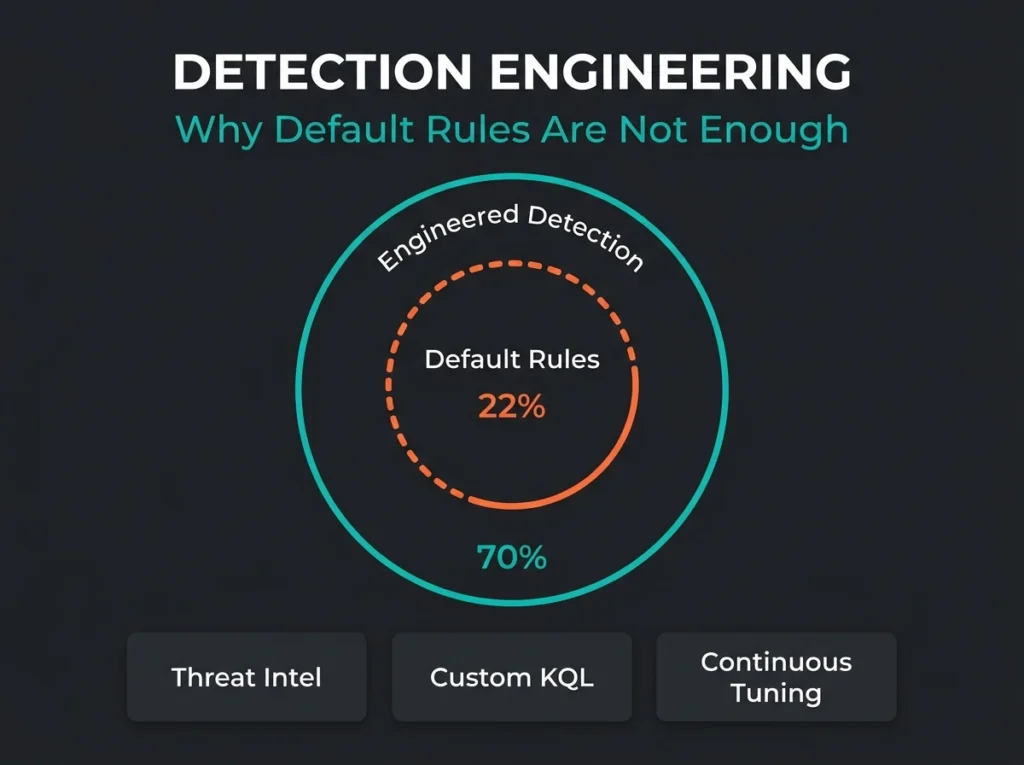
We inherit a lot of Microsoft Sentinel workspaces at Falconer Security, and nearly all of them tell the same story. Someone flipped on a batch of default analytics rules, watched alerts roll in, and convinced themselves the SIEM was doing its job. It wasn’t. The gap between “we have a SIEM” and “we actually catch attacks” almost always comes down to missing detection engineering.
For the scale of the problem, look at the CardinalOps 2025 State of SIEM Detection Risk report. Enterprise SIEMs detect only 22% of MITRE ATT&CK techniques even though the raw telemetry usually covers about 90% of them. The rules either don’t exist, were never tuned against the environment, or silently broke when a schema changed. 13% of production SIEM rules are non-functional on any given day because of misconfigured data sources, missing fields, or parsing drift. You’re paying for log storage nobody actually reads.
This post walks through what detection engineering means for Microsoft Sentinel, why default rules create a false sense of security, and what a managed Sentinel provider should be doing week to week to close the gap.
- Default rules catch little. Enterprise SIEMs detect only 22% of MITRE ATT&CK techniques even though the collected telemetry usually covers about 90%, and 13% of production rules are silently broken on any given day.
- Engineering transforms the numbers. Proper detection engineering cuts false positives by 70 to 80%, pushes coverage of relevant techniques to 50 to 70%, and drops mean time to detect from days to minutes or hours.
- Expect 50 to 200 custom rules. A provider doing real detection work maintains that many per client environment, and roughly 20% of active rules need meaningful adjustment every quarter.
- Prioritise 20 to 30 techniques. Covering all 211 ATT&CK techniques is not the goal; build reliable detections for the ones matching your industry and stack first.
- In-house rarely pencils out. A dedicated detection engineer runs SEK 900,000-plus per year, which is why most 50 to 500 employee companies buy the capability through a managed Sentinel service.
What detection engineering means for Microsoft Sentinel
Detection engineering is ongoing technical work: building, testing, tuning, and maintaining the rules that decide whether real threats actually get caught in your environment. It isn’t a product feature. It isn’t a box you tick during onboarding. And it’s not something you hand to the person who runs your firewall on a spare Tuesday.
Inside Sentinel, that work comes down to writing KQL analytics rules, correlating signals across whichever data connectors you’ve wired up (endpoints, identity, email, cloud apps, network), mapping the detections to MITRE ATT&CK, and making sure each rule still fires when the behaviour it was written for actually happens. All four of those things have to be true at the same time. Drop one and the detection quietly becomes decorative.
Sentinel as a platform gives you the log storage, the query engine, the rule templates. That’s the starting line, not the finish. Detection engineering is what turns the starting line into something that catches attacks instead of producing noise.
Why default Sentinel rules create a false sense of security
Deploy Sentinel today and the Content Hub will offer you hundreds of pre-built analytics rule templates. Enable a big batch, watch alerts appear, declare victory. This is easily the most common mistake we see in inherited workspaces, and it’s worth spelling out exactly how the failure happens.
For concrete examples of rules that look useful on paper but generate pure noise in practice, see our breakdown of 5 default Sentinel rules that generate nothing but noise.
- They were written for a generic environment, not yours. An “anomalous sign-in location” rule fires constantly when half your workforce is on the road or behind a shared VPN gateway. Without baselining the organisation’s normal patterns first, rules like this just train analysts to ignore alerts.
- They assume data sources that may not be connected. Plenty of templates expect specific log tables (Sysmon events, Defender telemetry, particular identity tables) that simply aren’t enabled in every workspace. The rule shows “Enabled” in the portal, happily queries an empty table, and detects nothing. Nobody notices until an incident.
- They look at single events instead of attack chains. Real intrusions don’t happen in one log line. A phishing email leads to a credential harvest, which leads to an OAuth consent grant, which leads to lateral movement and eventually exfiltration. Template rules pick up individual steps, if anything. Catching the chain requires correlation rules that stitch events together across sources and time.
- They rot over time. Attackers shift tactics. Microsoft renames tables. Your environment grows new applications, retires old ones, changes logging levels. A rule that was solid six months ago may no longer match the data it was written against, and nobody will know until somebody audits.
Key finding: CardinalOps found that enterprise SIEMs cover only 4 of the top 10 MITRE ATT&CK techniques most commonly observed in real attacks. The telemetry to detect those techniques is usually already being collected. The tuned rules are just not there.
The detection engineering lifecycle in a managed Sentinel environment
Detection engineering isn’t a project with a completion date. It’s a weekly cycle that a dedicated team runs on repeat. Here’s the shape of it in a managed Sentinel engagement, using Falconer Security’s process as the reference.
Threat intelligence and requirements
Every detection starts with a question: which threats are realistically going to target this client’s industry, geography, and tech stack? We read through intelligence feeds, Microsoft security advisories, and recent incident postmortems to pick out the techniques attackers are currently using against organisations that look like our client. When the client falls under NIS2, this stage also maps required detection capabilities back to Article 21 risk-management obligations so compliance evidence is built in from day one rather than bolted on later.
Log validation
Before we write a single KQL rule, we verify the data is actually arriving in the workspace. Unglamorous, yes. Also the step where most in-house teams burn weeks without realising it. A rule aimed at a log table that isn’t being collected, that uses a schema the vendor has since renamed, or that relies on a field Microsoft quietly deprecated will look perfectly healthy in the portal and catch absolutely nothing. Log validation is the difference between a detection that works and one that’s been silently dead for four months.
Rule development and testing
Then we write the rule itself: custom KQL analytics tuned to the specific environment. In practice that breaks down into four intertwined tasks:
- Baseline normal behaviour in the workspace so “anomalous” has a meaningful definition (sign-in patterns, process execution, outbound network flows, admin activity)
- Build detection logic around deviations from that baseline, not against a generic global pattern
- Replay the rule against historical data to see whether it would have fired on incidents the client already knows about
- Where possible, simulate the underlying technique in a lab to confirm the rule catches the real behaviour rather than just something that looks superficially similar
One well-tuned Sentinel detection is hours of work, sometimes days if the data is awkward. That is exactly why detection engineering needs its own people instead of being squeezed onto the plate of an analyst who’s already juggling ticket queues.
Deployment and monitoring
New rules roll out in stages. We drop the rule into the workspace at informational severity first, so it generates alerts without triggering incidents. We watch it for two weeks, check false-positive patterns, and only then promote it to production severity. Any rule that blows up the alert queue in that window gets pulled back and reworked before it ever reaches the SOC.
Continuous tuning and retirement
Rules that drift into false-positive territory get tuned. Rules that never fire get investigated, and either the threat turned out to be irrelevant to the environment or the detection logic was broken from the start (both happen, about equally often). Rules that no longer reflect current attacker techniques get retired and replaced. On our managed workspaces roughly 20% of active rules need a meaningful adjustment every quarter. It’s steady maintenance, not heroics.
What changes when detection engineering is done properly
The contrast between a Sentinel workspace running on default rules and one with proper detection engineering is easy to measure if you care to look.
| Metric | Default Rules Only | With Detection Engineering |
|---|---|---|
| MITRE ATT&CK coverage | 15-25% of techniques | 50-70% of relevant techniques |
| False positive rate | 60-80% of alerts are noise | Under 10% false positive rate |
| Broken/silent rules | 10-15% of enabled rules | Under 2% (caught by validation) |
| Mean time to detect | Days to weeks (if detected at all) | Minutes to hours |
| Analyst efficiency | Drowning in false positives | Investigating real threats |
In the workspaces we’ve taken over, adding custom detection engineering on top of proper log validation typically cuts false positives by 70-80% and roughly triples or quadruples meaningful alert coverage. The practical result: the SOC spends its day investigating actual threats, not clicking through hundreds of “expected behaviour” tickets just to clear the queue.
Why most SMBs cannot do detection engineering in-house
The skill profile is specific. You need fluency in KQL, working knowledge of MITRE ATT&CK, a feel for how attackers actually move through a compromised environment, and familiarity with the data schemas across every Microsoft security product. And you need that person to have time, consistently, week after week.
In a typical company with 50 to 500 employees, the person “responsible for Sentinel” is usually also responsible for endpoint management, Entra ID, firewall rules, and user support tickets. Ask them to also research emerging threats, prototype detections in a lab, and maintain a library of custom KQL, and what you’re really asking for is two full-time jobs compressed into one headcount. Something is going to get dropped. In our experience, the thing that gets dropped is detection engineering, because nothing breaks loudly when it’s missing.
That’s the gap managed Sentinel services close. The provider brings the detection engineers, the threat intelligence pipeline, and the operational discipline to keep detection quality stable over time. The client gets enterprise-grade coverage without hiring a dedicated detection engineer at SEK 900,000-plus per year.
What to ask your managed Sentinel provider about detection engineering
If you already have a managed Sentinel provider, or you’re shortlisting one, these questions are good diagnostics for whether they do detection engineering or just babysit default rules:
- How many custom detection rules do you maintain per client? “We use the built-in templates” means you’re paying for monitoring, not engineering. A provider doing real detection work should have 50 to 200 custom rules live per environment, sometimes more.
- How do you validate that detection rules still function? Rules break silently, and the only way to catch it is systematic testing against known techniques. If they can’t describe their validation process, they don’t have one.
- How quickly do you produce detections for new threats? When a new attack technique drops (a zero-day, a novel phishing chain, a living-off-the-land trick), is the turnaround days, weeks, or “when we get around to it”?
- What is your false positive rate? A serious provider can tell you the average across their client base. One that can’t isn’t measuring detection quality, which means nobody is tuning anything.
- Do you map detections to MITRE ATT&CK and report coverage gaps? You should be getting regular reporting that shows which techniques you can detect, which you can’t, and the plan to close the gap.
Detection engineering and NIS2 compliance
The NIS2 Directive tells organisations in essential and important sectors to implement “appropriate and proportionate” measures for incident detection and handling. Article 21 spells out security incident handling and “basic cyber hygiene practices and cybersecurity training” as required capabilities. None of that tells you what the technical implementation looks like, and that’s where a proper detection programme does most of the evidentiary work.
Three specific ways detection engineering feeds into NIS2:
- Incident detection capability: custom detection rules tuned to your actual threat profile are evidence that the measures you’ve implemented are proportionate to your risk, not just off-the-shelf defaults copied from a vendor blog.
- Incident handling: detections mapped to MITRE ATT&CK give you the structured classification that NIS2 reporting expects, so when an incident hits you’re not improvising categorisation at 2 AM.
- Continuous improvement: the build-test-tune-retire cycle is itself documentation of the ongoing risk management process NIS2 assumes exists.
For a detailed mapping of NIS2 requirements against Sentinel capabilities, see our guide on NIS2 Article 21 mapped to Microsoft Sentinel.
Getting started: from default rules to engineered detection
If your Sentinel workspace is running on defaults today, the path forward is three phases. None of them are glamorous, all of them pay off.
- Audit the current state. Pull a list of all enabled analytics rules. Count built-in templates versus custom. Check which rules have actually triggered in the last 90 days and which have been silent the whole time. That baseline tells you exactly where you’re starting from, and usually the answer is worse than people expect.
- Validate your data sources. For each rule you care about, run its KQL query manually and confirm it returns data from the log tables it’s meant to query. Rules running against empty tables are theatre, not detection, and you can’t fix them without knowing they exist.
- Prioritise by threat relevance. Covering all 211 MITRE ATT&CK techniques is neither realistic nor useful. Identify the 20 to 30 that actually match your industry, your tech stack, and the adversaries going after your sector. Build reliable detections for those first, then expand outward as capacity allows.
If you don’t have the in-house expertise or the time to do this properly, a managed Sentinel service with real detection engineering capability is the practical alternative. A security assessment is usually the right first step: it tells you where your gaps actually are before you commit to building or buying anything. From there the build-vs-buy decision tends to answer itself.
Frequently asked questions
What is detection engineering?
Detection engineering is the ongoing work of building, testing, tuning, and maintaining security detection rules that catch real threats in a specific environment. For Microsoft Sentinel, that means writing custom KQL analytics rules, verifying the data sources those rules depend on, mapping detections to MITRE ATT&CK, and updating rules as attacker techniques and environments change. It’s an operational function that runs continuously, not a one-off configuration task.
Why aren’t Microsoft Sentinel’s default analytics rules enough?
Default Sentinel analytics rules are generic templates written for broad applicability. They don’t know your environment’s normal behaviour patterns or which data sources you actually have connected, and they target individual events rather than multi-step attack chains. On top of that, CardinalOps research found 10-13% of SIEM rules in production are broken at any given time due to misconfigured sources or schema drift, so even the ones that look enabled may be silently doing nothing.
How many custom detection rules should a managed Sentinel provider maintain?
A provider doing genuine detection engineering should maintain 50 to 200 custom detection rules per client environment, scaled up for larger organisations or higher-risk sectors. These sit alongside the built-in templates and cover environment-specific logic, correlation rules for multi-step attacks, and detections written in response to emerging threats relevant to the client.
What percentage of MITRE ATT&CK should my Sentinel detections cover?
Full coverage of all 211 ATT&CK techniques isn’t realistic and isn’t the goal. Most organisations should focus on the 20 to 30 techniques most relevant to their threat profile and aim for 50-70% coverage of that prioritised set. For context, the CardinalOps 2025 report found the average enterprise SIEM covers only 22% of all techniques and only 4 of the top 10 most commonly observed in real attacks.
How does detection engineering relate to NIS2 compliance?
NIS2 Article 21 tells organisations to implement incident detection and handling capabilities proportionate to their risk profile. Detection engineering provides the structured, documented, continuously maintained detection programme that stands up as evidence of compliance. Threat-informed rule development, regular validation, and coverage-gap analysis map cleanly to the ongoing risk management NIS2 expects you to be doing.