Azure Security Assessment: What We Check and Why

Your company runs workloads in Azure. A handful of VMs, some storage accounts, maybe a database or two. Then someone in leadership asks how you actually know any of this is secure, and that is usually where an Azure security assessment starts. We run these for SMBs across Sweden and the Nordics and the findings repeat themselves with depressing regularity. Default configurations left untouched since the tenant was first spun up. Overprivileged identities nobody can explain. Logging blind spots that would make post-incident forensics a joke.
What follows is what a proper Azure security assessment looks like: what it includes, the tools we use, what we keep finding, and how to sequence remediation so you meet both industry benchmarks and EU rules like NIS2.
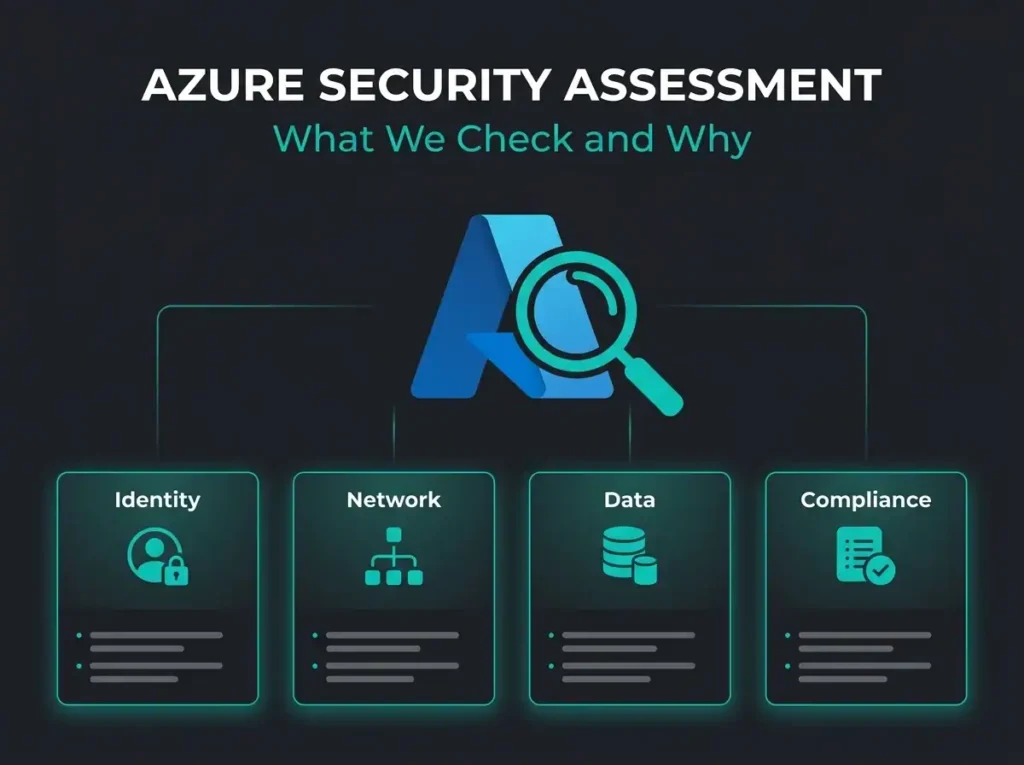
- Seven areas define the scope. A proper assessment reviews identity, network, data protection, logging, compute, governance, and compliance alignment against the MCSB and CIS Azure benchmarks.
- Logging gaps are the norm. Most assessed tenants have diagnostic logging enabled on less than half of their Azure resources, which turns post-incident forensics into guesswork.
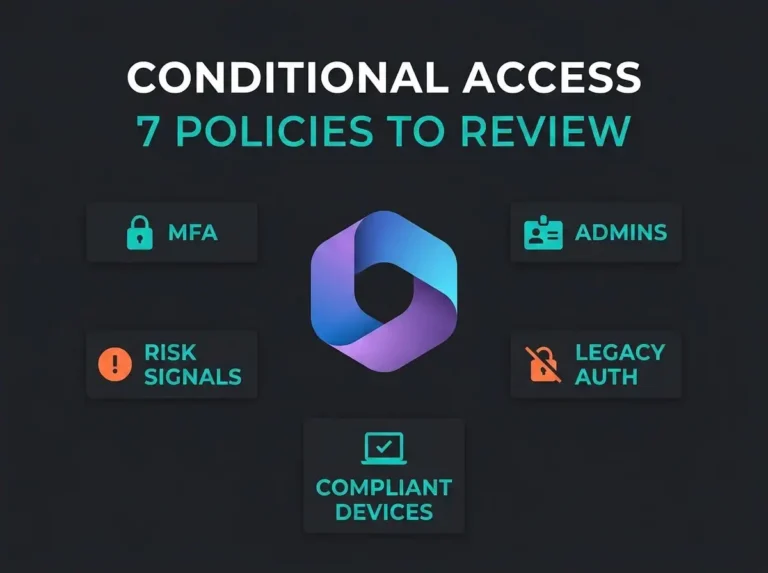
- Conditional Access is usually half-finished. Organisations disable Security Defaults and implement 2-3 policies instead of the 7-10 needed, often leaving legacy authentication unblocked.
- Budget 5,000 to 15,000 euros. A full assessment for 1-3 subscriptions lands in that range and takes 3 to 5 business days; continuous monitoring runs 1,000 to 3,000 euros per month.
- Assessment before pen test. Fix known configuration gaps first; findings arrive as a prioritised roadmap with critical items due inside 48 hours, each mapped to its NIS2 Article 21 requirement.
What Is an Azure Security Assessment?
An Azure security assessment is a structured review of your Azure environment’s security posture. It looks at identity and access management, network segmentation, data protection, logging, and compliance alignment against benchmarks like the Microsoft Cloud Security Benchmark (MCSB) and CIS Azure Foundations Benchmark.
A penetration test simulates attacks. An assessment is a different animal. It reviews configuration and posture to identify misconfigurations, excessive permissions, and missing controls before an attacker trips over them. If you are an organisation subject to the NIS2 Directive, regular assessments also produce documented evidence of the risk management measures required under Article 21, which matters more than people realise when the supervisory authority eventually comes calling.
Why Azure Environments Need Regular Assessment
Cloud environments drift. Something that was clean on day one changes the moment teams add resources, tweak access policies, and switch on new services. The IBM Cost of a Data Breach Report 2025 puts the global average cost of a breach at $4.44 million. Cloud misconfigurations remain a steady contributor to that figure.
Microsoft processes 100 trillion security signals daily and blocks over 600 million identity attacks per day, and MFA alone blocks more than 99.2% of account compromise attacks per Microsoft’s own documentation. With that context in view, it is a bit embarrassing that we still walk into tenants where MFA is not enforced for all users, or where Security Defaults got disabled but nobody wrote the Conditional Access to replace them, or where diagnostic logging is off on production resources because somebody clicked through a deployment wizard without reading it.
Remember, the shared responsibility model puts Microsoft on the hook for the infrastructure. You own how you configure and use it. An assessment is how you close the gap between what you believe is configured and what actually is.
The 7 areas we check in every Azure security assessment
A decent assessment covers the whole stack. Here is what we evaluate in every engagement, mapped to MCSB controls and to practical risk in plain language.
1. Identity and access management
Identity is the primary attack surface in cloud. Almost every intrusion we investigate started with a credential, not an exploit. We review:
- MFA enforcement across all user accounts (not just admins)
- Conditional Access policies: number, scope, and gap analysis
- Privileged Identity Management (PIM) configuration for just-in-time access
- Guest and external user access permissions
- Service principal and managed identity hygiene
- Legacy authentication protocol status (should be blocked)
The finding we see most: someone turned off Security Defaults intending to move to Conditional Access, got halfway through writing the policy set, and then got pulled onto something else. The tenant has been sitting in the gap ever since.
2. Network security
We evaluate network segmentation and traffic controls.
- Network Security Group (NSG) rules for overly permissive inbound access
- Virtual network architecture and subnet segmentation
- Azure Firewall or third-party firewall configuration
- Private endpoint usage for PaaS services (storage, databases, Key Vault)
- Public IP exposure and Just-in-Time VM access
3. Data protection
Data classification and encryption controls tend to lag behind infrastructure deployment. Nobody builds a VM without thinking about CPUs; plenty of people build a storage account without thinking about who can read it.
- Encryption at rest (Azure Storage Service Encryption, Azure Disk Encryption)
- Encryption in transit (TLS enforcement, minimum version requirements)
- Azure Key Vault usage and access policies
- Storage account access controls (public blob access disabled, SAS token policies)
- Data loss prevention policies and sensitivity labels
4. Logging and monitoring
Without proper logging you cannot detect or investigate incidents. We check:
- Azure Activity Log retention and export to a SIEM (ideally Microsoft Sentinel)
- Diagnostic settings on critical resources (Key Vault, SQL, Storage)
- Microsoft Entra ID sign-in and audit log retention
- Alert rules for high-risk activities (role assignments, policy changes)
- Network Watcher and NSG flow log configuration
Most of the tenants we assess have diagnostic logging switched on for less than half of their Azure resources. Once an incident hits, forensic investigation becomes guesswork at that point, and depending on what is missing, sometimes not even possible guesswork.
5. Compute security
Virtual machines and containers need ongoing hardening, not a one-time image bake.
- OS patch compliance and update management configuration
- Endpoint detection and response (Defender for Servers) deployment
- VM extension audit and unused resource cleanup
- Container image vulnerability scanning
- Azure Kubernetes Service (AKS) cluster security configuration
6. Governance and policy
Azure Policy enforces guardrails at scale, so we look at whether the guardrails exist and whether anyone is actually paying attention to what they report.
- Azure Policy assignments and compliance status
- Resource tagging strategy for cost and ownership tracking
- Management group hierarchy and subscription organisation
- Resource locks on critical infrastructure
- Blueprint or template usage for consistent deployments
7. Compliance alignment
Findings get mapped against the frameworks the client actually needs to answer to.
- NIS2 Article 21 requirements (risk management measures, incident handling, supply chain security)
- GDPR data protection controls
- ISO 27001 control alignment
- Industry-specific requirements (healthcare, financial services)
| Assessment Area | Key Tools | Common Findings | Risk Level |
|---|---|---|---|
| Identity & Access | Entra ID, PIM, Conditional Access | Incomplete MFA, excessive Global Admins | Critical |
| Network Security | NSGs, Azure Firewall, Private Endpoints | Open management ports, missing segmentation | High |
| Data Protection | Key Vault, Storage Encryption, DLP | Public blob access, weak TLS settings | High |
| Logging & Monitoring | Activity Log, Sentinel, Diagnostic Settings | Logging gaps, no SIEM integration | High |
| Compute Security | Defender for Servers, Update Management | Unpatched VMs, missing EDR | Medium-High |
| Governance | Azure Policy, Management Groups | No policy enforcement, missing tags | Medium |
| Compliance | Regulatory Compliance dashboard | Unmapped NIS2/GDPR controls | Medium-High |
Azure security assessment tools we use
Running a useful assessment means combining Microsoft’s native tooling with actual manual review by someone who has seen a few tenants. The automation catches the known-bad. The human picks up the architectural mistakes and the business-context problems that no scanner will flag because it does not know which resources actually matter to you.
Microsoft Defender for Cloud
Microsoft Defender for Cloud is the primary assessment engine. It is a Cloud Native Application Protection Platform (CNAPP) with two capabilities that matter for an assessment:
- Cloud Security Posture Management (CSPM): evaluates configurations against MCSB, generates a Secure Score, and provides prioritised recommendations
- Cloud Workload Protection (CWPP): runtime threat detection for servers, containers, storage, databases, and other workload types
The free Foundational CSPM tier gives you basic posture assessment. The paid Defender CSPM tier bolts on agentless vulnerability scanning, attack path analysis, and cloud security graph queries. The paid tier makes the assessment materially deeper, and for anything past a trivial environment it is worth the money.
Azure Advisor
Azure Advisor provides personalised recommendations across reliability, security, performance, cost, and operational excellence. Its security recommendations align with MCSB and complement Defender for Cloud findings, though if you are serious about posture you treat it as a second opinion, not a primary tool.
Microsoft Secure Score
Secure Score gives you a number for your security posture. The number itself is beside the point. What matters is the individual recommendations behind it and whether anyone is actually working through them, but it does give you a useful baseline to measure improvement over time. We wrote about this in our Microsoft Secure Score guide.
Manual review
Automated tools miss things. A real assessment also covers architectural decisions that quietly create risk, like flat network designs that let a compromised workload reach everything. It covers business context, because the scanner does not know which storage account holds the customer data. It covers operational practices: who has access, how changes are approved, whether the break-glass account is documented somewhere other than one person’s head. And it covers cross-service dependencies, because Key Vault access from a service principal that nobody tracks is how small breaches become big ones.
What we typically find: top 5 Azure security gaps
After running assessments across dozens of SMB Azure environments, these are the issues we encounter most often.
- Incomplete Conditional Access coverage. Organisations disable Security Defaults and then implement maybe 2-3 Conditional Access policies instead of the 7-10 needed for proper coverage. Legacy authentication remains unblocked. Break-glass accounts are not excluded properly, or they are excluded but not monitored, which is arguably worse.
- Diagnostic logging disabled on critical resources. Azure does not enable diagnostic logging by default on most resources. Without explicit configuration, Key Vault access logs, Storage read/write logs, and SQL audit logs simply do not exist. You cannot investigate what was never recorded.
- Overprivileged service principals. Applications registered years ago with Contributor or Owner permissions on entire subscriptions, long forgotten but still active. Service principals with certificate credentials that expired and got renewed without anyone reviewing whether the permissions were still appropriate, or whether the app itself is still in use.
- Missing network segmentation. Every resource sitting in one virtual network with no subnet-level NSG rules. Management ports (RDP/SSH) open to the internet because Azure Bastion seemed like too much effort during the original deployment.
- No SIEM integration. Azure Activity Logs retained for the default 90 days with no export. No centralised logging. No alerting on critical operations. When something goes wrong, the forensic trail is either incomplete or gone entirely.
How to prepare for an Azure security assessment
Getting real value out of an assessment takes a bit of preparation. Not a lot. Enough that we are not guessing about your environment on day one.
- Document your Azure architecture. Subscription structure, resource groups, virtual networks, and key integrations. Even a rough whiteboard diagram helps.
- List your compliance requirements. NIS2, GDPR, industry-specific regulations, and any customer-imposed requirements.
- Identify your critical assets. Which resources hold customer data, financial records, or intellectual property?
- Provide appropriate access. The assessment team needs Security Reader across subscriptions and Global Reader in Entra ID.
- Gather existing documentation. Security policies, incident response plans, previous audit reports.
Preparation usually runs 2-3 hours of actual work. It pays back several-fold in the quality and relevance of the findings you get.
From assessment to action: prioritising remediation
An assessment that sits in a PDF on someone’s SharePoint is worthless. We deliver findings as a prioritised remediation roadmap, not a list of issues, and we structure it like this:
- Critical (fix within 48 hours): Active security gaps like open management ports, disabled MFA for privileged accounts, or publicly exposed storage
- High (fix within 2 weeks): Missing logging, incomplete Conditional Access, unpatched critical vulnerabilities
- Medium (fix within 30 days): Governance gaps, policy enforcement, tagging strategy
- Low (plan for next quarter): Architecture improvements, advanced threat protection features, cost optimisation
For NIS2-regulated organisations we map each finding to the specific Article 21 requirement it touches, so the compliance team can track remediation against regulatory obligations without a translation step.
Azure security assessment vs. M365 security assessment
A lot of the SMBs we work with use both Azure IaaS/PaaS services and Microsoft 365. They share an Entra ID tenant, which means identity security overlaps a lot between them. The scope of the assessments themselves is different though:
| Aspect | Azure Security Assessment | M365 Security Assessment |
|---|---|---|
| Primary focus | Infrastructure, network, compute, storage | Email, collaboration, data governance |
| Key tool | Defender for Cloud | Microsoft Secure Score, Purview |
| Identity overlap | Entra ID, Conditional Access, PIM | Entra ID, Conditional Access, PIM |
| Common findings | Network exposure, missing logging | Email security gaps, sharing policies |
| Compliance focus | NIS2, ISO 27001, CIS Azure | NIS2, GDPR, HIPAA (if applicable) |
We recommend a combined assessment for anyone using both platforms. The identity layer is shared, and gaps in one environment almost always create risk in the other. Our M365 security audit guide goes deeper on the M365 side.
Continuous assessment: beyond the one-time review
A single assessment is a snapshot, not a strategy. Continuous security posture management is what keeps your environment secure as it evolves, and Defender for Cloud’s CSPM capabilities, combined with managed SOC services, are how you get ongoing visibility without hiring a team to do it by hand.
The elements we typically build into a continuous assessment programme:
- Defender for Cloud Secure Score monitored and trended weekly
- Azure Policy enforcement with deny and audit effects
- Automated remediation for common misconfigurations
- Quarterly assessment reviews to catch configuration drift
- SIEM integration with Microsoft Sentinel for real-time detection
For SMBs without an internal security team, a virtual CISO can own the assessment programme, prioritise remediation, and report progress to leadership. That last piece matters more than teams expect. An assessment programme that does not report upward becomes invisible, and invisible programmes get defunded during the next budget cycle.
Frequently Asked Questions
How long does an Azure security assessment take?
A standard assessment for an SMB Azure environment takes 3-5 business days, including data collection, analysis, and report creation. Larger environments with multiple subscriptions or complex architectures may take 1-2 weeks.
How much does an Azure security assessment cost?
Costs vary based on scope. For SMBs with 1-3 Azure subscriptions, expect a range of €5,000 to €15,000 for a full assessment. Continuous monitoring through a managed security provider typically costs €1,000-3,000 per month depending on the number of resources monitored.
Do I need an Azure security assessment if I already use Defender for Cloud?
Yes. Defender for Cloud is an excellent automated tool, but it cannot evaluate architectural decisions, business context, or operational practices. A professional assessment interprets Defender for Cloud findings in the context of your specific environment and produces a prioritised remediation plan.
How does an Azure security assessment support NIS2 compliance?
NIS2 Article 21 requires organisations to implement appropriate technical and organisational measures for cybersecurity risk management. An Azure security assessment documents evidence of risk identification, evaluates technical controls, and maps gaps to specific NIS2 requirements. That documentation supports both internal governance and regulatory audits.
What’s the difference between a security assessment and a penetration test?
A security assessment evaluates configurations, policies, and controls against established benchmarks. A penetration test actively attempts to exploit vulnerabilities to demonstrate real-world attack paths. Both are useful. Run the assessment first: there is little point penetration testing an environment with known configuration gaps.
Next steps
An Azure security assessment tells you where your cloud environment actually stands and what needs to change. Whether you are preparing for NIS2 compliance, answering a board-level security question, or just want to know your Azure environment is configured properly, a structured assessment is the starting point.
Falconer Security provides Azure security assessments for SMBs across Sweden and the Nordics. We combine Microsoft-native tooling with hands-on review to deliver actionable findings, not generic checklists. Contact us for a free initial consultation.